REVIEWS
Reviews that finish on time and reflect the whole year.
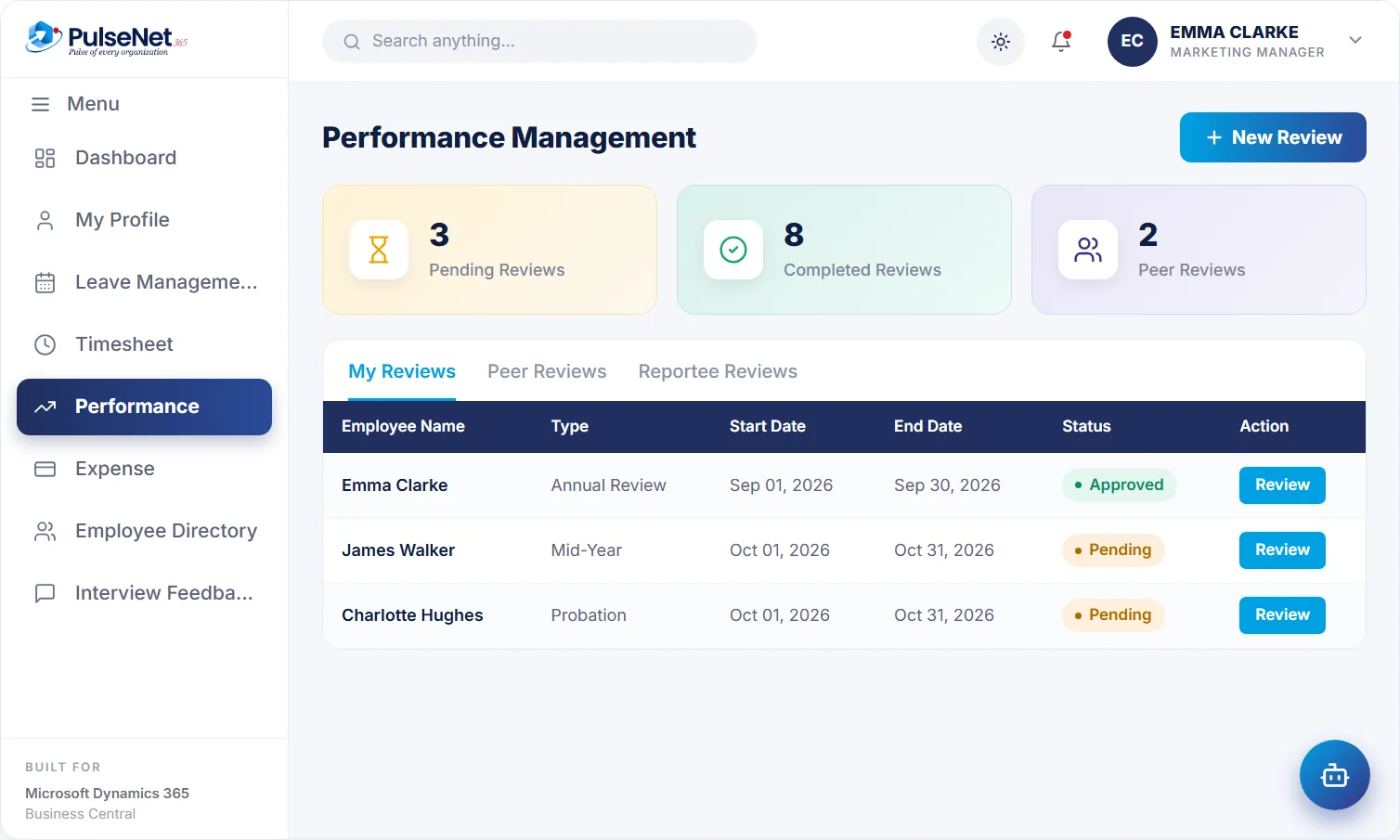
Self, peer and manager reviews coordinated in one place, with pending and completed reviews at a glance and goals and review cycles tracked for every employee.
- Built for Business Central
- One employee record
Performance reviews. Illustrative screen with sample data.
Self review done
Emma Clarke
Peer feedback 3 of 3
collected
Review locked
meeting booked
THE PROBLEM
Why review season drags on for months
Performance reviews rarely fail because managers do not care. They fail because the process depends on chasing. Forms go out by email, some come back, a few are edited after the manager has read them, and by the time the last one arrives the year it describes feels distant. Employees notice when reviews are late or inconsistent, and they draw their own conclusions about how much the organisation values them.
A single viewpoint is the other weakness. A review based only on the manager’s memory of the last two months misses the project the employee led in spring and the colleague who relied on them every single week of the year.
WHAT GOES WRONG TODAY
- Review forms edited after submission, so nobody trusts the final version.
- Probation reviews held late because nobody was tracking them.
- Feedback that reaches the employee weeks after the conversation, if at all.
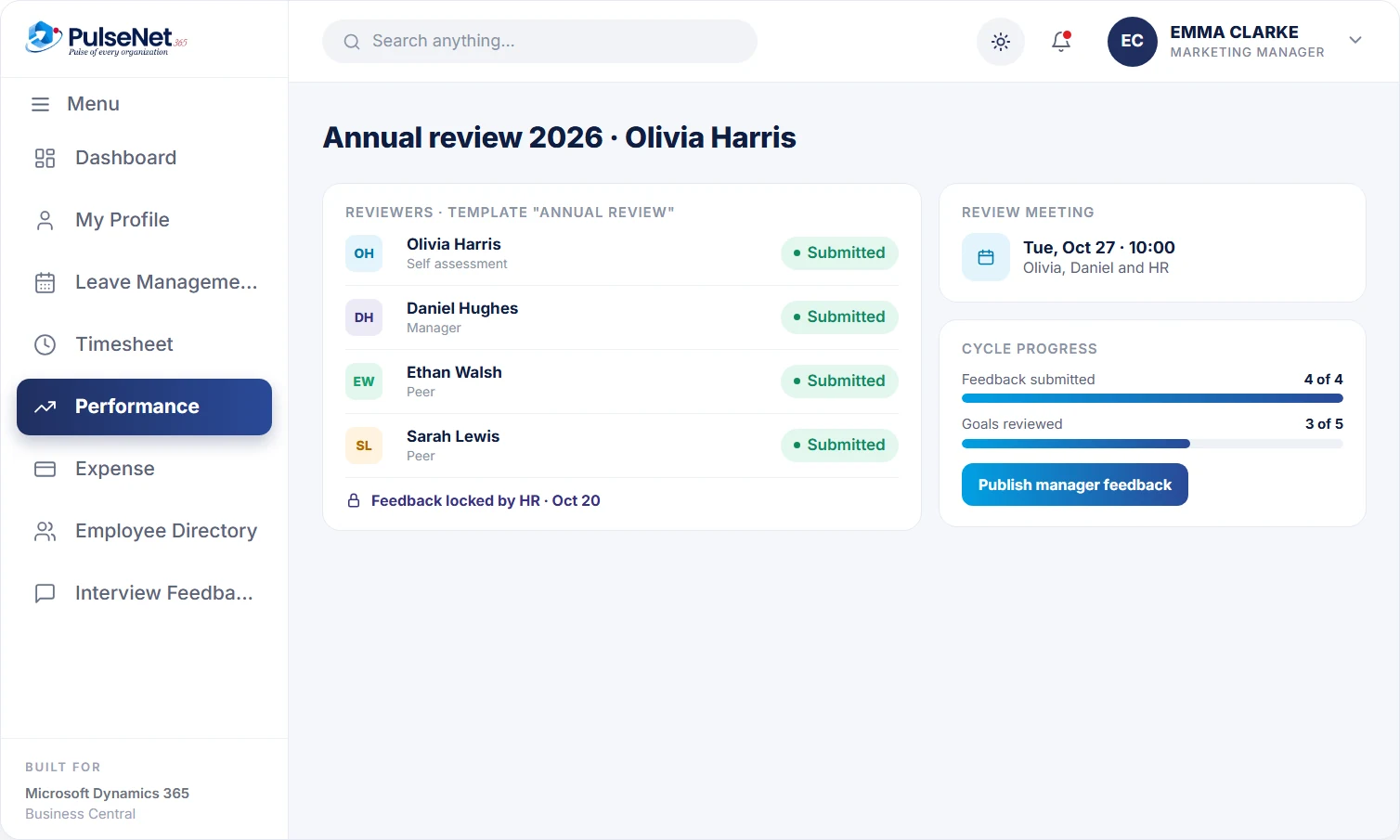
Reviewer status and review meeting. Illustrative screen with sample data.
WHAT IT DOES
Built for the way performance and talent actually runs.
- Self, peer and manager reviews in one place
- Annual, mid-year and probation reviews
- Pending and completed reviews at a glance
- Goals and review cycles tracked per employee
- Reminders keep every cycle on schedule
01
Set goals
Agree objectives at the start of the cycle.
02
Collect feedback
Self, peer and manager input in one form.
03
Review
Managers see every response in one place.
04
Close the cycle
Outcomes recorded against the employee.
IN DETAIL
A review cycle that runs to a schedule
Templates, reviewer roles, status tracking and a locked record, so every employee is assessed the same way and hears the outcome clearly.
Reusable templates by review type
HR builds templates with the questions and evaluation points for each reviewer role: the employee’s self-assessment, the manager and peers where relevant. Separate templates for probation, annual and project reviews keep the questions relevant, and assigning a template to a group means everyone in it is assessed against exactly the same criteria, whoever their manager is.
Reviewer status you can see
Each review has a period, such as quarterly, half-yearly or annual, and each reviewer has a status: assigned, submitted or locked. HR sees exactly whose input is still outstanding in the current cycle, and reminders keep the cycle moving, so reviews happen when they are due instead of quietly slipping into the next quarter without anyone noticing.
Feedback locked before the meeting
Once every reviewer has submitted, HR locks the feedback so nothing changes after the fact. The review meeting is then scheduled with the employee, the manager and HR, and everyone discusses the same written record in the room. Locking is what turns a review into something an employee, a manager or HR can rely on months later.
A conclusion the employee receives
After the meeting, HR records the conclusion and publishes the manager’s feedback to the employee in writing. The outcome stays on the employee record next to goals, training and earlier reviews, so the next cycle, a promotion case or an internal move starts from what was actually said rather than what people happen to remember.
WHO IT HELPS
What a fair review asks of each person
Employees
Complete a self-assessment against the same template as everyone in their group, know when the review meeting is, and receive the manager’s published feedback in writing afterwards. Peer input means the review reflects more than one person’s view of their year.
Managers
Write their assessment knowing it will be locked before the meeting, see which peer reviews are still outstanding, and walk into the conversation with every input in one place. Probation, annual and project reviews follow the same routine, so managers learn one process.
HR
Builds templates, assigns them, sets review periods and watches reviewer status across the organisation. HR locks feedback, joins the review meeting, records the conclusion and publishes it, which keeps the process consistent between departments and between individual managers year after year.
Leaders
See which reviews are pending and which are complete, and draw on consistent, locked outcomes when planning promotions, succession and training budgets. Because reviews sit beside training and role history, talent conversations start from evidence rather than from whoever argues hardest.
ON BUSINESS CENTRAL
Performance data next to the rest of the record
Business Central does not include performance reviews. Its built-in HR features cover the employee record, qualifications and absence. PulseNet365 adds the review engine: templates, reviewer roles, review types for probation, annual and project reviews, status tracking, locking, the review meeting and a published conclusion. Because reviews are stored against the same employee in Business Central, they sit beside training history and role details, and Power BI can report on review completion alongside headcount and leave.

Business Central provides
- Employee records with job title and employment details
- Qualifications with dates, types and institutions
- No review templates, cycles or feedback workflow built in
PulseNet365 adds
+
Self, manager and peer templates for probation, annual and project reviews
+
Review periods and reviewer status: assigned, submitted, locked
+
HR locking, a review meeting and published manager feedback
+
Goals set during onboarding carried into the first review
GOOD PRACTICE
Review practices that build trust
Keep notes through the year
Ask managers to jot a line after significant pieces of work, good and bad. A review drawn from notes across twelve months is fairer than one drawn from memory of the last few weeks, and it stops the outcome turning on whatever happened most recently.
Choose peers who saw the work
Pick two or three peers who worked closely with the employee during the period, not the most senior people available. Tell peers what the review is for and give them the same questions every time, so their input can be compared across the team.
Separate development from pay
Where you can, hold the pay conversation at a different time from the development review. When salary is on the table, people defend their year instead of discussing how to improve, and the useful half of the review is lost.
QUESTIONS
Performance & Talent questions, answered.
Which review types can we run?
Probation, annual and project reviews, each with its own template and a review period such as quarterly, half-yearly or annual. You can run more than one type at once, so a probation review for a new starter does not wait for the annual cycle, and a project review can close when the project does.
Why lock feedback before the review meeting?
So the record the employee and manager discuss is the one that stays on file. Without locking, forms get edited after the conversation and the written review stops matching what was said. Once HR locks the feedback, each reviewer’s status shows as locked and the review meeting can be scheduled.
Who sees the final outcome?
After the review meeting, HR records the conclusion and publishes the manager’s feedback to the employee. Access to the full review, including individual reviewer input, follows role-based access, so you decide which roles see it. A common approach is to keep individual reviewer detail with HR and the reviewing manager.
Does PulseNet365 write reviews for managers?
No. PulseNet365 structures and schedules the review; managers and HR write it and make the judgements. Because reviews sit in Business Central, Copilot in Business Central can help people find and summarise records where your licence includes it, but the assessment itself stays with people. Our article on reviews people trust explains why.
How do reviews connect to training?
Development needs agreed in a review can be followed up in Training and eLearning , where courses are assigned and completions recorded on the same employee record. The next review can then see which courses were completed since the last one, rather than relying on anyone’s memory.
WORKS WITH
Connected modules.
Every module shares the same employee record on Business Central, so adding another one adds no integration work.
Training & eLearning
Courses, certifications, growth plans.
Digital Personnel File
One 360° record per employee.
Self-Service
Everything employees and managers need.
+
+
+
+
Thirty minutes is enough to know if this fits.
Bring your Business Central setup and the process that costs you the most time. We will show you Performance & Talent on the platform you already run.